
Ta strona nie jest jeszcze przetłumaczona i jest wyświetlana po angielsku.
The browser version
You can use TraceDraw in a web browser with nothing to install. It is the same program as the desktop version, built for the browser, so the menus, tools and files are the same.
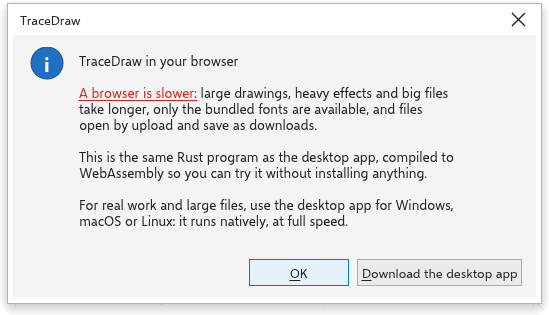
The message at start
Each time the page opens, a message explains that the browser version is the same program as the desktop one, and what differs. OK (or Enter) closes it; a second button opens the downloads of the desktop version. On Windows a third button opens TraceDraw in the Microsoft Store, and the message adds that the Store version may be one or more releases behind the latest download, because the Store certifies each version first.
What differs from the desktop
- Speed. Large drawings, heavy effects, tracing, mosaics and big exports are slower, and keep the page busy until they finish. The desktop version runs at full speed.
- Files. Opening and importing use the browser's file picker; saving, exporting and printing download a file. Recent drawings are not listed, because a browser cannot reopen an uploaded file.
- Fonts. The page brings its own fonts and fetches more the first time your text needs them.
- Settings are kept in that browser on that computer.
- Keys. While the drawing has the focus, the program's shortcuts reach TraceDraw instead of the browser, except the clipboard keys, reload and the browser's developer tools. Ctrl+N, Ctrl+T and Ctrl+W always stay with the browser, so use the File menu to create and close drawings.
- Screens. It suits a desktop browser with a mouse and keyboard. On a tablet, install it as an app and use the Touch workspace (see Tablets and the Android app and Workspaces); a phone screen is too small for editing.
- Macros. Macro projects load and run in the desktop version only. In the browser, every macro command shows a message saying so, with a button to the desktop downloads.
- Updates. The page is always the latest version; there is nothing to install. Installed as an app, it keeps the version you last used and takes a new one the next time it starts after all its windows were closed.
- Unsaved drawings. Closing or reloading the tab, or leaving the page, with unsaved changes asks first with the browser's own question. Auto-backups are kept in the browser's storage for the site, and the next visit offers what a closed, reloaded or crashed tab left, as the desktop version does after a crash (see Auto-backup and recovery). Clearing the site's data removes them.
- Pen pressure. A pen's pressure sets the width of Freehand and Brush Strokes as on the desktop, where the browser passes it on (current Chrome, Edge, Firefox and Safari do when the system reports it). See Drawing with a graphics tablet.