
Diese Seite ist noch nicht übersetzt und wird auf Englisch angezeigt.
Brush strokes and painterly brushes
Brush strokes turn a line you draw into a filled shape with a varying width, like ink from a pen or a brush. Painterly brushes paint the outline of an object with marks of chalk, ink, watercolor and other media.
Brush Strokes
The Brush Strokes tool (I) draws strokes in one of five modes. A Preset, Brush, Calligraphic or Expression stroke stays the path you drew, an open curve of a few nodes, with the brush as its live outline: edit its nodes with the Shape tool afterwards and the brush follows. The Sprayer makes objects instead.
To draw a brush stroke:
- Choose the Brush Strokes tool.
- Choose a mode and its settings on the property bar or in the Brush Strokes panel.
- Drag on the page.
To turn existing curves into strokes, select them and click Apply to curve in the Brush Strokes panel; the curve stays a curve with the brush as its outline.
With a graphics tablet, the pen's pressure sets the width of Preset, Brush and Expression strokes; see Drawing with a graphics tablet.
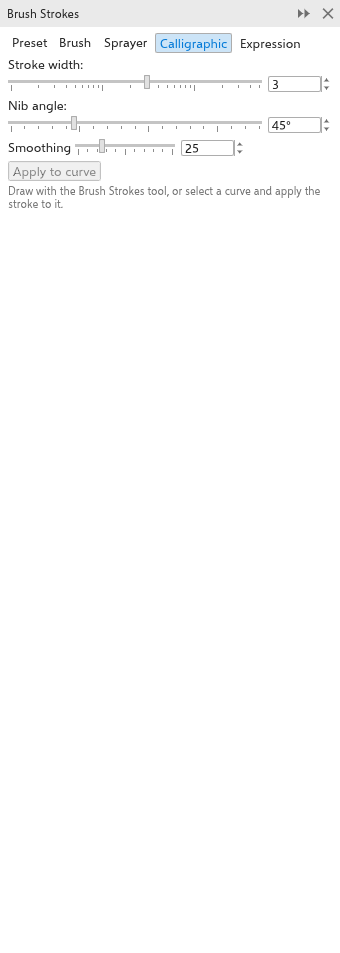
Modes
- Calligraphic: a flat nib of the given width, held at the given angle (45 degrees at first). The stroke is thinnest where you move along the nib and widest across it.
- Preset: a stroke whose width follows a profile: taper both ends (at first), taper start, taper end, bulge, wave or flat. The width is the widest point.
- Brush: a preset profile with a rough, dry-brush edge.
- Expression: the width follows the pen's pressure, or with a mouse your speed: slow strokes are wide. The pressure setting scales the effect.
- Sprayer: shapes (circles, squares, stars, hearts or leaves) placed along the line every spacing (8 mm at first), each between 70% and 100% of the width.
Settings
- Width: 3 mm at first.
- Angle: the nib's angle, for Calligraphic.
- Smoothing: 0 to 100 (25 at first). Higher values smooth out wobbles.
- Pressure: how much the width follows the pen pressure (0.5 at first), for Preset, Brush and Expression.
- Spacing: for Sprayer.
Painterly Brush
The Painterly Brush tool, in the same flyout, paints a line made of brush marks. The brushstroke is an ordinary curve with no fill: the Shape tool reshapes it, the outline color colors it, and the marks follow.
To paint a stroke:
- Choose the Painterly Brush tool.
- Choose a brush, a size and a transparency on the property bar.
- Drag on the page.
To paint the outline of existing objects, click them to select them, then pick a brush: their outlines are painted with it. Changing the size or the transparency changes their brushstrokes. Clear Brushstroke gives the selected objects their plain outline back.
Brushes and settings
- Brush: dry media (Chalk, which is the first, Charcoal, Soft Pastel), wet media (Ink Wash, Watercolour, Dry Brush) and textures (Bristle, Fur, Spray, Speckle, Cloud, Silk Ribbon).
- Brush size: 0.1 to 200 mm, 5 mm at first.
- Transparency: 0 to 100%, 20% at first.
Most brushes thin out towards both ends. The marks are laid the same way each time the stroke is drawn, exported or printed. With "Scale with object" on, the marks grow and shrink with the object. In SVG and PDF exports the marks become filled shapes with their transparency.