
Diese Seite ist noch nicht übersetzt und wird auf Englisch angezeigt.
Vector and picture mosaics
A mosaic rebuilds the selected objects, or a picture, out of many small tiles. A vector mosaic uses colored shapes; a picture mosaic uses photos from a folder of your own.
Vector Mosaic
Open the Vector Mosaic panel with Effects > Vector Mosaic.
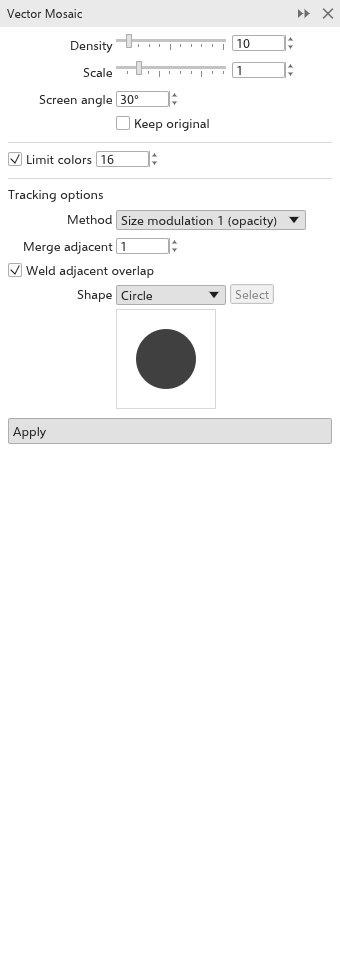
- Select the objects or bitmaps to turn into a mosaic.
- Set the options:
- Density: tiles per inch (10 at first); Scale: the size of each tile within its cell (1 at first); Screen angle: how the rows are turned (30 degrees at first).
- Keep original: off deletes the selection once the mosaic is made.
- Limit colors: reduce the tiles to at most that many colors (16 at first).
- Method: Uniform (every tile full size, transparency flattened on white), Size modulation 1 (the tile size follows the opacity, at first) or Size modulation 2 (darker areas give bigger tiles).
- Merge adjacent: combine up to that many neighbouring tiles of one color; Weld adjacent overlap: one curve per color instead of one object per tile.
- Shape: circle (at first), square or custom. For a custom tile, select a closed curve and click Select.
- Click Apply.
The mosaic is one group placed on top of the selection, and is selected.
Picture Mosaic
Open the Picture Mosaic panel with Effects > Picture Mosaic.
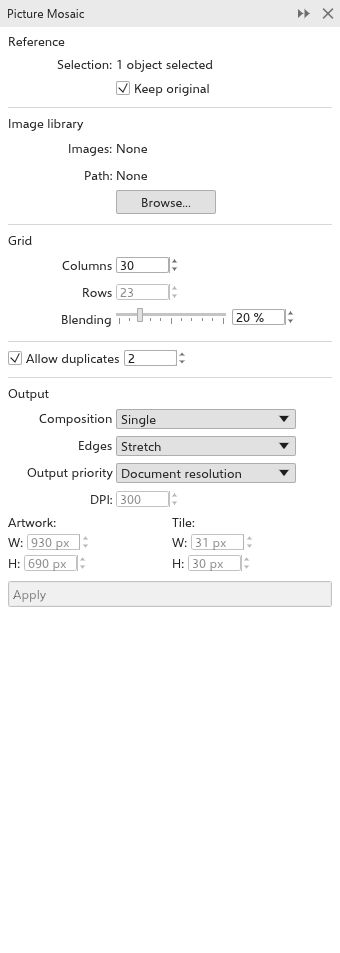
- Select the objects or bitmaps to rebuild.
- Under Library, click Browse and choose a folder of pictures (PNG, JPEG, BMP, GIF, WebP or TIFF; up to 1000). The panel shows how many it holds.
- Set the options:
- Keep original (on at first).
- Columns: tiles across (30 at first); the rows follow from the shape of the selection. Blending: how much of the selection shows over the tiles (20% at first).
- Allow duplicates (on), with the tile spacing: the fewest tiles between two uses of one picture.
- Composition: single, stack or array; Edges: stretch the last row or remove it; Output priority and the resolution: how large the mosaic is in pixels. The panel shows the resulting size.
- Click Apply.
Note: The browser and Android versions cannot read folders: there, Browse lets you choose the pictures themselves, several at once.