
Cette page n'est pas encore traduite et s'affiche en anglais.
Document info
File > Document Info opens the Document Info dialog box. It keeps information about the drawing, such as its title and author, and reports everything the drawing holds.
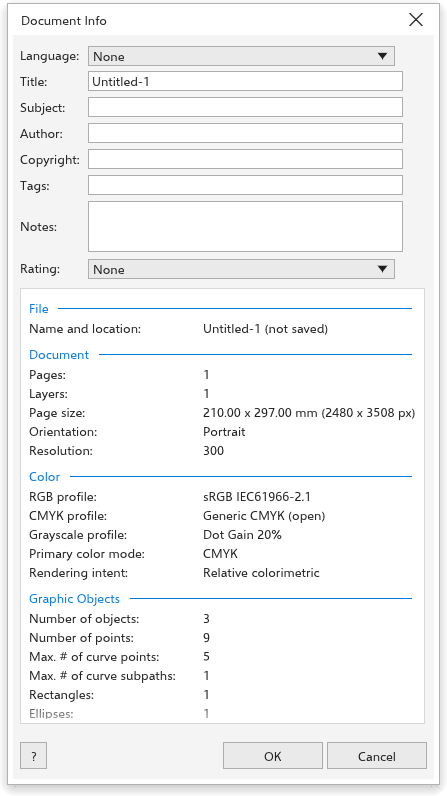
Describing the drawing
- Language: the language of the drawing's text, or none. PDF files written from the drawing carry it, which helps screen readers.
- Title, Subject, Author, Copyright, Tags (keywords written to PDF and SVG files) and Notes (several lines).
- Rating: none or one to five stars.
Click OK to keep the changes, as one undo step. Cancel leaves everything as it was. The title, subject and rating can also be set when you save; see Save As.
The report
Under the fields, a report lists what the drawing holds, in sections:
- File: the name and location of the file.
- Document: the pages and layers, the page size (in the drawing units and in pixels), the orientation and the resolution.
- Color: the color profiles, the primary color mode and the rendering intent.
- Graphic Objects: the number of objects and of points, the most points and parts one curve has, and the curves, rectangles, ellipses, polygons, groups and tables.
- Word Count: artistic and paragraph texts, characters, words and the fonts used.
- Bitmap Objects: the number of bitmaps, their total pixels and the largest one.
- Styles: object and color styles.
- Effects: each effect, with how many objects use it.
- Fills and Outlines: the objects by kind of fill and outline, and how many use each color model.
- Symbols: symbols defined and instances placed.
The report helps before sending a file to print: for example, it shows which fonts the drawing needs and whether it holds RGB colors. For a full check, see Preflight.