
此頁面尚未翻譯,以英文顯示。
Time tracker
The time tracker records the time you spend on a drawing, task by task, and keeps the records in the drawing (in .tdraw files). Time counts only while you work: after a few idle minutes the clock waits, and your next action starts it again.
The Time Tracker toolbar
Window > Toolbars > Time Tracker shows a bar with:
- the list of tasks, to choose the active task, or add a new one;
- the time of the active task;
- the record and pause button;
- a light: red while counting, amber while idle, gray when paused or without a task;
- the total of every task;
- a button that opens the dialog box.
Starting the clock on a drawing without tasks adds "Task 1".
The Time Tracker dialog box
Tools > Time Tracker lists the tasks with their time, start and finish, and the total.
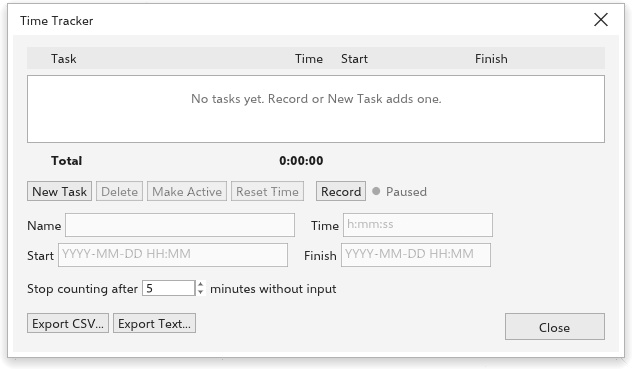
- New task, Delete, Make active and Reset time act on the selected task. Double-click a task to make it active.
- Record and Pause start and stop the clock.
- Edit the selected task's name, time (such as
1:30:00,1:30or1.5hours), start and finish (such as2026-10-19 14:30). - Stop counting after N minutes without input sets the idle time (5 minutes at first).
- Export CSV and Export text save the records, for a spreadsheet or a report.
Recording time is not an edit of the drawing: it makes no undo step. The records are saved with the drawing's next save.