
Эта страница ещё не переведена и показана на английском.
Envelopes
An envelope is a frame of nodes around an object; the object is bent to fill the frame, and follows when you move its nodes. Use it to arch text, bulge a shape or fit artwork into a flag or a circle. The object keeps its own shape, so the envelope can be changed or removed at any time.
To add an envelope
With the tool:
- Choose the Envelope tool from the Effects flyout.
- Click an object. It gets a frame of eight nodes: the corners and the middle of each side.
- Drag the nodes to reshape the frame.
With the panel (Effects > Envelope, Ctrl+F7):
- Select an object.
- Click Add new, or click one of the 24 preset shapes (arch, circle, flag, heart, cloud, speech bubble and more) to use it as the envelope.
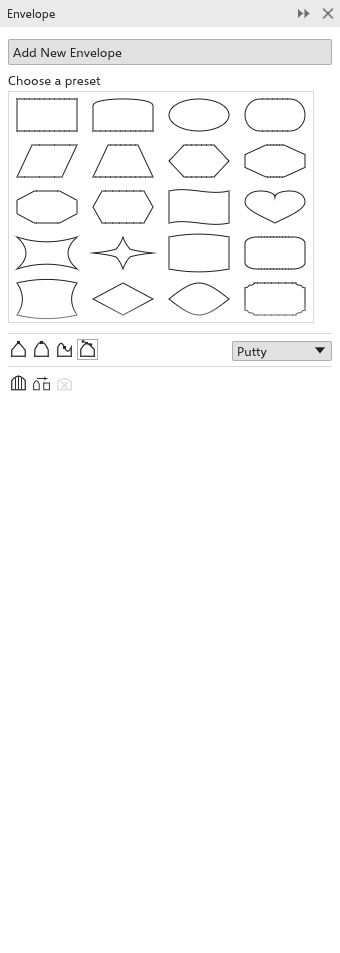
Editing the frame
The editing mode, chosen on the property bar or in the panel, decides what happens to the sides when you drag a node:
- Straight line: the sides stay straight;
- Single arc: the sides become one smooth arc;
- Double arc: the sides become S curves;
- Unconstrained (at first): the node carries its handles; click a node to see its two handles and drag them to bend each side on its own.
Double-click the frame to add a node, a node (other than a corner) to delete it. In the unconstrained mode the property bar also has Add node and Delete node. The Shape tool edits the frame the same way.
Envelope settings
- Presets on the property bar: arch, bulge, squeeze, flag, perspective and circle.
- Mapping, how the object fills the frame: Putty (at first), Original (spread evenly along the frame), Horizontal or Vertical (only across or only up).
- Keep lines: straight segments of the object stay straight.
- Add new envelope puts a fresh frame around the object as it now looks, over the envelope it has.
- Copy envelope properties: click another object to copy its envelope (as Object > Copy Effect > Envelope From). Click an object without an envelope, such as a circle, a star or a curve you drew, to fit the selected text or objects into its shape: they move into that shape and fill it.
- Clear envelope removes the last envelope.