
এই পৃষ্ঠাটি এখনও অনূদিত হয়নি এবং ইংরেজিতে দেখানো হচ্ছে।
Converting objects to bitmaps
Image > Convert to Bitmap (also Object > Convert to Bitmap) turns the selected objects into one bitmap. Use it to flatten complex artwork, or to prepare objects for bitmap effects. It is one undo step.
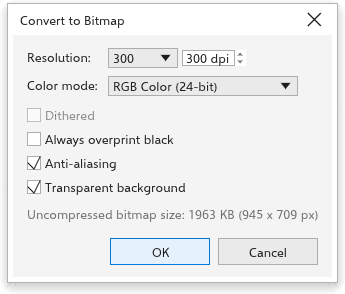
Settings
- Resolution: choose from the list (72 to 600 dpi) or type a value (36 to 2400; 300 at first).
- Color mode: Black and White (1-bit), Grayscale (8-bit), Indexed (8-bit), RGB Color (24-bit, at first) or CMYK Color (32-bit).
- Dithered: for Black and White and Indexed, mixes dots to suggest the shades that are missing.
- Always overprint black: the black of the bitmap prints over the colors beneath.
- Anti-aliasing (on at first): smooth edges; off gives hard pixel edges.
- Transparent background (on at first); off puts the objects on white.
The dialog box shows how large the bitmap will be, uncompressed.